ACC Invoice Submission
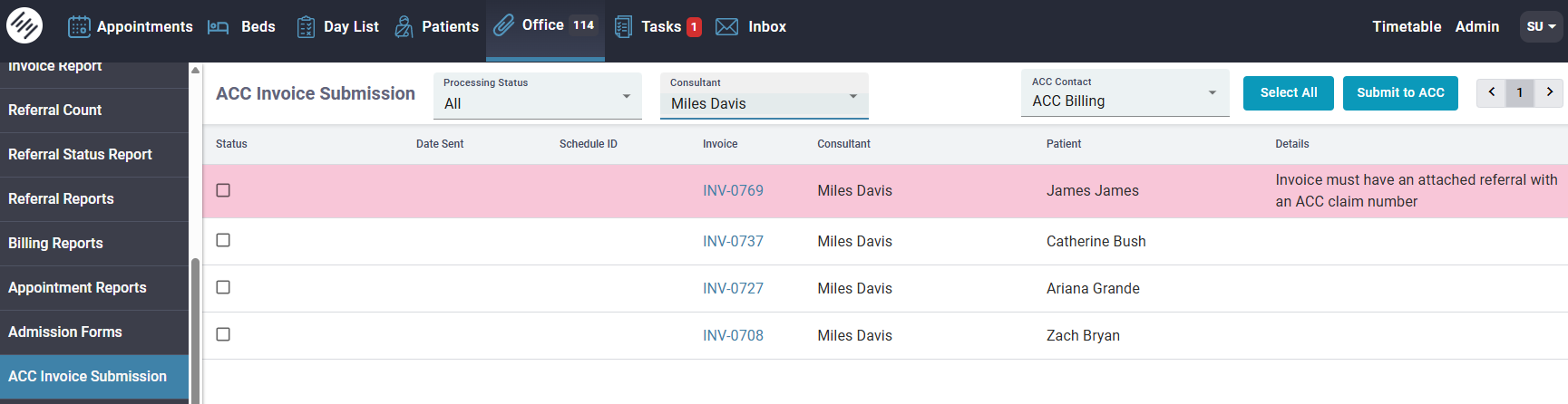
The ACC Invoice Submission menu is where you can view, filter, and submit invoices to ACC, as well as track their processing status in real time. This screen also helps you quickly identify issues before submission and monitor invoice progress after submission.
Filters
At the top of the screen, you can use filters to narrow down invoices:
- Processing Status: Filter invoices by their ACC lifecycle stage (see full status definitions below).
- Consultant: Select a specific consultant to view only their invoices.
- ACC Contact: Filter invoices based on the selected ACC billing contact.
Bulk Actions:
You can manage invoices in bulk:
- Select All: selects all visible invoices
- Submit to ACC: submits selected invoices to ACC
- You can also filter first, then submit only matching invoices (e.g. per consultant or status)
Error and Details Panel
Each invoice row includes a Details column that shows validation messages. These messages are:
- Intuitive and designed to clearly explain what is missing or incorrect
- Shown before submission so issues can be fixed quickly
Note
Example: “Invoice must have an attached referral with an ACC claim number”. You can simply click on the invoice link to open it and make corrections. If the issue is related to configuration (e.g. missing setup), update your Admin settings and then try submitting the invoice again.
Processing Status Definitions
Invoices move through different ACC processing stages. Below is what each status means:
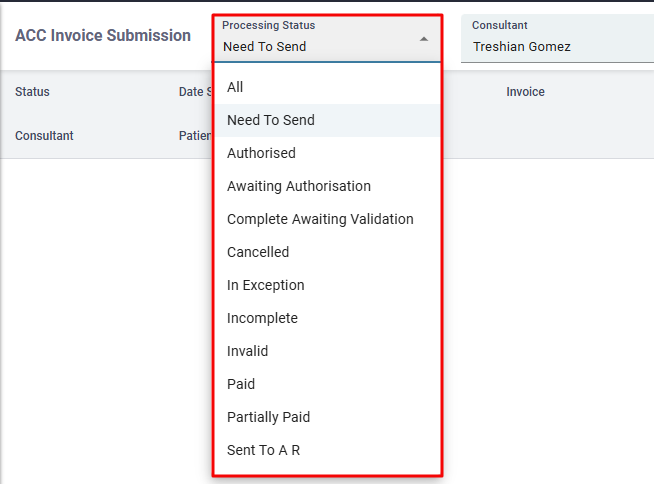
- Need to Send: Invoices that have been created but have not yet been submitted to ACC.
- Authorised: Invoice has been approved by ACC and is waiting for payment.
- Awaiting Authorisation: Invoice has passed validation and is waiting for ACC approval.
- Complete & Awaiting Validation: Invoice has been submitted and is waiting for ACC validation. (This is usually the first status after submission.)
- Cancelled: Invoice has been cancelled by ACC.
- In Exception: ACC encountered an issue during processing that requires manual intervention.
- Incomplete: Invoice could not be completed at the time of processing and has been paused until resolved.
- Invalid: There is a data or logic issue with the invoice (e.g. incorrect dates). This usually means the invoice failed ACC validation rules.
- Paid: Invoice has been fully paid by ACC.
- Partially Paid: Invoice has been partially paid, declined or not fully settled by ACC.
- Sent to AR: The invoice has been reversed and returned to accounts receivable (e.g. payment was made in error and refunded).
Note
You can find everything related to setup and configuration here: ACC Setup & Configuration Guide